
Website Design and Development: A Complete Guide for Small Businesses
A website is often the first serious interaction a potential customer has with a business.
Before contacting a company, requesting a quote, booking a service, or making a purchase, people may visit its website to understand what the business offers and whether it appears trustworthy.
That is why a business website should be more than an attractive collection of pages. It should communicate clearly, work smoothly, provide a good user experience, and support the goals of the business.
This guide explains the fundamentals of website design and development, what makes a business website effective, how the development process works, and what small businesses should consider before launching their next website.
What Is Website Design and Development?
Website design and website development are two different but connected parts of creating a website.
Website design focuses on the visual appearance and user experience of a website. It covers elements such as layouts, typography, colors, images, navigation, buttons, spacing, and the way information is presented.
Website development focuses on building the technical functionality behind that design. Depending on the project, this can involve HTML, CSS, JavaScript, PHP, databases, content management systems, APIs, forms, e-commerce features, and third-party integrations.
A simple way to understand the difference is:
Design determines how the website looks and feels. Development makes the website function.
A successful website needs both.
Why Does Website Design Matter for Small Businesses?
Good website design is not simply about choosing attractive colors or creating impressive graphics.
It should make information easy to understand and help visitors move naturally through the website.
A well-designed business website can help visitors quickly answer important questions:
- What does this business do?
- What products or services does it provide?
- Who does it serve?
- Why should I trust it?
- How can I contact or buy from it?
When the answers are clear, visitors can make decisions more easily.
Visual Consistency Builds Recognition
A business website should reflect the company’s overall brand identity.
Consistent use of:
- Logo
- Brand colors
- Typography
- Photography
- Graphics
- Visual style
can make a business appear more professional and recognizable across its digital channels.
Good Design Reduces Friction
Visitors should not have to work hard to find basic information.
Clear navigation, readable content, visible buttons, logical layouts, and well-organized pages can make the website easier to use.
Good design often feels simple because unnecessary complexity has been removed.
Why Does Website Development Matter?
Even the best visual design cannot create a successful website if the underlying functionality does not work properly.
Development turns the planned design into an operational website.
Depending on the project, development may include:
- Page creation
- Forms
- Search functionality
- User accounts
- Payment systems
- Product catalogs
- Booking systems
- Database connections
- Third-party integrations
- Content management
- Security features
The development approach should match the actual needs of the business.
A small service company may need a relatively simple website, while an online retailer or software company may require much more advanced functionality.
What Makes a Good Business Website?
There is no single formula that works for every business.
However, most effective business websites share several important characteristics.
1. A Clear Homepage
The homepage should quickly communicate the business’s purpose.
A visitor should be able to understand the company and its primary offering without having to explore several pages first.
A strong homepage may include:
- A clear headline
- Short supporting information
- Primary services or products
- Key benefits
- Trust signals
- Relevant visuals
- A clear next step
2. Simple Navigation
Navigation should help visitors move through the website naturally.
Common sections might include:
- Home
- About
- Services
- Products
- Portfolio
- Blog
- Contact
The exact structure should depend on the business.
A website with fewer, well-organized pages can be more effective than one with dozens of confusing menu options.
3. Useful Service or Product Pages
Important services and products deserve dedicated pages.
Instead of simply listing a service name, explain:
- What the service provides
- Who it is designed for
- What problem it solves
- Key benefits
- How the process works
- Relevant examples
- Frequently asked questions
- How the visitor can get started
These pages can also become valuable destinations for search traffic.
4. Clear Calls to Action
Visitors should know what action they can take next.
Depending on the business, this might be:
Contact Us
Request a Quote
Book a Consultation
Get Started
Buy Now
The objective is not to fill every section with buttons.
The objective is to make the next logical step easy to find.
5. Trust-Building Content
A website needs to give visitors reasons to feel confident about the business.
Useful trust signals can include:
- Customer testimonials
- Case studies
- Portfolio projects
- Reviews
- Certifications
- Awards
- Industry experience
- Client logos
- Company information
Trust signals should always be genuine and relevant.
User Experience: Make the Website Easy to Use
A website can look beautiful and still provide a poor experience.
User Experience, commonly called UX, focuses on how easily visitors can interact with the website and accomplish their goals.
Good UX means visitors can:
- Find information quickly
- Understand the page
- Navigate without confusion
- Complete forms easily
- Use the website on different devices
- Complete important actions without unnecessary steps
A useful test is to imagine yourself visiting the website for the first time.
Ask:
“Would I immediately understand what to do next?”
If the answer is no, the design may need improvement.
Responsive Design: Your Website Must Work Across Devices
People browse websites using smartphones, tablets, laptops, and desktop computers.
A responsive website adapts its layout to different screen sizes.
Important considerations include:
- Readable typography
- Flexible layouts
- Proper image sizing
- Touch-friendly buttons
- Mobile navigation
- Easy-to-use forms
- Avoiding unnecessary horizontal scrolling
A website should not be designed only for a desktop monitor and adjusted for mobile later.
Mobile usability should be considered from the beginning of the design process.
Website Content Is Part of the Design
Design and content should not be treated as completely separate activities.
A beautiful layout cannot compensate for unclear messaging.
Before designing a page, determine:
What is the purpose of this page?
Who is going to read it?
What information do they need?
What should they do after reading it?
This approach helps designers create layouts around real information rather than filling pre-designed sections with unnecessary text.
Clear content also makes a website easier to scan.
Use:
- Short paragraphs
- Descriptive headings
- Bullet points
- Relevant images
- Examples
- Useful internal links
Website Performance and Speed
Visitors expect websites to respond quickly.
Large images, unnecessary scripts, excessive animations, poorly configured plugins, and inefficient code can all contribute to a slower experience.
Performance improvements may include:
- Compressing images
- Using appropriate image formats
- Optimizing code
- Reducing unnecessary scripts
- Using caching
- Choosing suitable hosting
- Keeping software updated
Website performance is not only a technical concern.
A faster, more usable website can create a better experience for visitors.
Website Security Matters
Security should be considered during development rather than after a problem occurs.
A business website may handle:
- Contact information
- Customer enquiries
- Login details
- Payments
- Business data
- Third-party integrations
Basic security practices can include:
- HTTPS
- Strong passwords
- Updated software
- Updated plugins and themes
- Regular backups
- Limited administrator access
- Trusted third-party services
Businesses should also establish a process for keeping their website software and integrations maintained after launch.
Building an SEO-Friendly Website
Website design and development also have an important relationship with Search Engine Optimization (SEO).
An SEO-friendly website should make it easier for search engines to discover and understand its content.
Important foundations can include:
- Logical website structure
- Descriptive URLs
- Proper heading hierarchy
- Internal links
- Descriptive page titles
- Useful meta descriptions
- Image alt text
- Mobile-friendly layouts
- Accessible content
- Crawlable pages
SEO should not be treated as an excuse to fill pages with keywords.
A website should first be useful to people.
When the structure, content, technical foundation, and user experience are strong, SEO can become a natural part of the website strategy.
WordPress or Custom Website Development?
One of the first technology decisions a business may face is choosing how its website will be built.
WordPress
WordPress is a content management system that allows businesses to manage website content without manually editing every page of code.
It can be suitable for:
- Business websites
- Blogs
- Service websites
- Portfolio websites
- Small e-commerce stores
- Content-driven websites
Its large ecosystem of themes and plugins also provides flexibility.
However, using WordPress does not automatically make a website good.
The quality still depends on:
- Design
- Hosting
- Theme selection
- Plugin selection
- Configuration
- Security
- Performance
- Content
- Maintenance
Custom Development
Custom development may make more sense when a business requires specialized functionality.
Examples include:
- Customer portals
- Advanced booking platforms
- Custom dashboards
- Complex integrations
- Specialized business applications
- Unique workflows
Custom development can provide greater flexibility, but it may also require more development time, technical expertise, and ongoing maintenance.
The best technology is the one that fits the business—not necessarily the most complicated option.
Template Website or Custom Design?
Businesses also need to decide whether to start with a template or create a more customized design.
Template-Based Websites
Templates can provide:
- Faster implementation
- Pre-designed layouts
- Lower initial development effort
- Established design patterns
They can be a practical choice for businesses with straightforward requirements.
Custom Website Design
Custom design can provide:
- Stronger brand differentiation
- More control over layouts
- Tailored user experiences
- Greater flexibility
- Custom functionality
A business should consider its goals, budget, audience, complexity, and future plans before choosing between the two.
A small business does not automatically need a highly expensive custom website.
The Website Design and Development Process
Building a website works best when the project follows a clear process rather than jumping directly into design or coding.
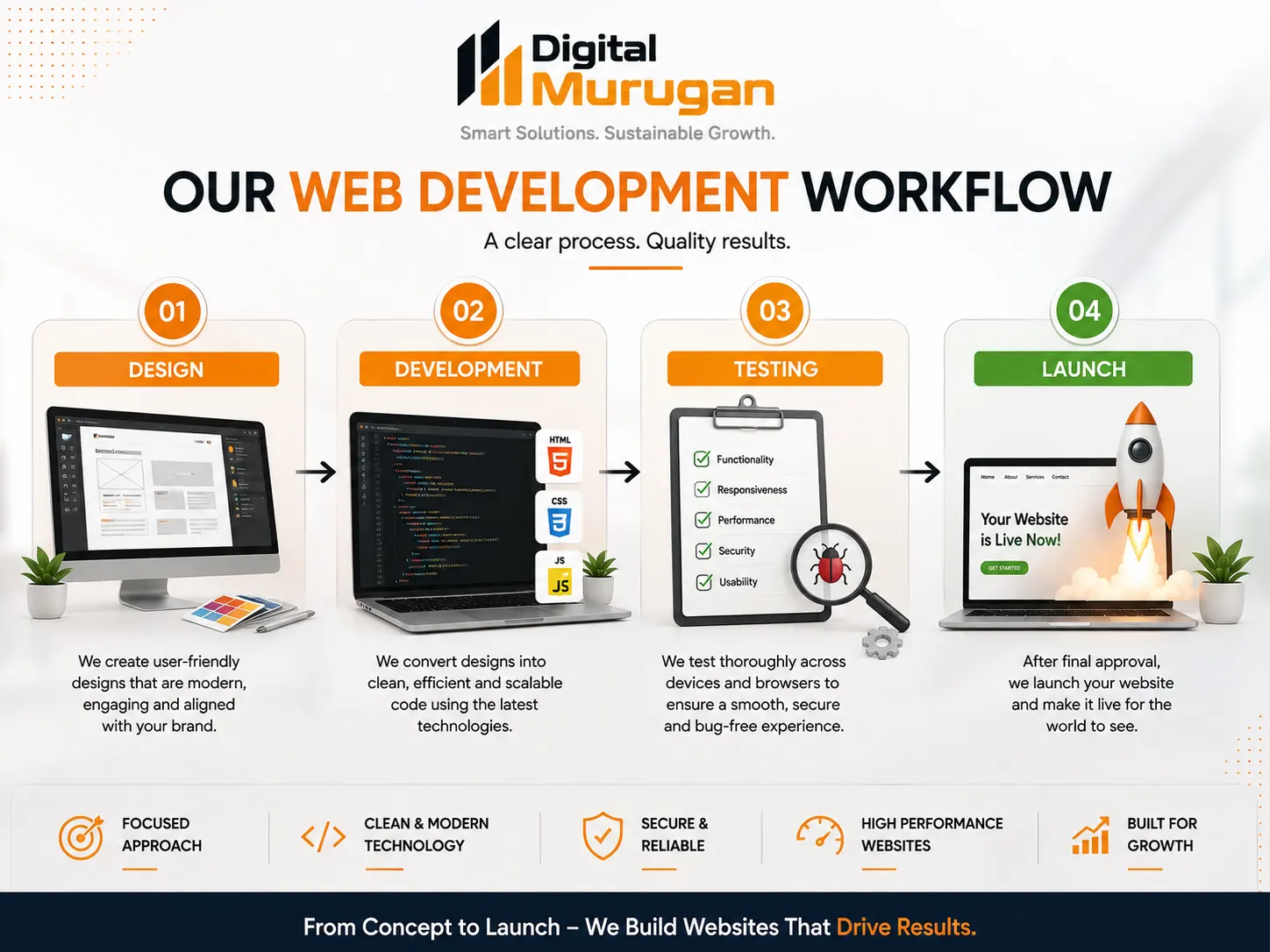
Design → Development → Testing → Launch
Step 1: Define the Website Goals
Start by deciding what the website needs to achieve.
For example:
- Generate enquiries
- Sell products
- Promote services
- Build credibility
- Receive bookings
- Publish educational content
- Support existing customers
Without clear goals, it becomes difficult to decide which pages and features are actually necessary.
Step 2: Understand the Target Audience
Identify the people who will use the website.
Consider:
- Their needs
- Their problems
- Their questions
- Their expectations
- Their buying journey
- Their preferred devices
A website designed around its audience is more likely to provide a useful experience.
Step 3: Plan the Website Structure
Before designing individual pages, create the overall structure.
Decide:
- Which pages are required
- How pages connect
- What belongs in the main navigation
- Which pages should link to each other
This creates a logical information architecture.
Step 4: Prepare the Content
Prepare the information visitors will need.
This can include:
- Headlines
- Service descriptions
- Product information
- Images
- FAQs
- About content
- Testimonials
- Calls to action
Content should be planned before or alongside the design rather than treated as something to add at the very end.
Step 5: Design the Website
Now the visual experience can be developed.
This includes:
- Page layouts
- Typography
- Colors
- Buttons
- Images
- Navigation
- Spacing
- Responsive layouts
The design should reflect the brand while keeping usability at the center.
Step 6: Develop the Website
The approved design is then converted into a working website.
Depending on the project, development may involve:
- CMS setup
- Coding
- Database configuration
- Forms
- E-commerce
- Integrations
- Security
- Analytics
Step 7: Test the Website
Testing should happen before launch.
Check:
- Navigation
- Links
- Forms
- Buttons
- Images
- Mobile layouts
- Different browsers
- Page loading
- Contact information
- Integrations
- Security settings
Small problems discovered before launch are usually easier to resolve than problems discovered by customers.
Step 8: Optimize
Review the website for:
- SEO
- Performance
- Accessibility
- Mobile usability
- Image optimization
- Content clarity
Step 9: Launch
Once the website has been reviewed and tested, it can be published.
But launching the website is not the end of the project.
Step 10: Monitor and Improve
After launch, monitor:
- Website traffic
- User behavior
- Enquiries
- Sales
- Performance
- Technical issues
- Search visibility
- Content opportunities
Use what you learn to improve the website over time.
Essential Elements of a Successful Business Website
A successful website combines several elements rather than relying on one feature.
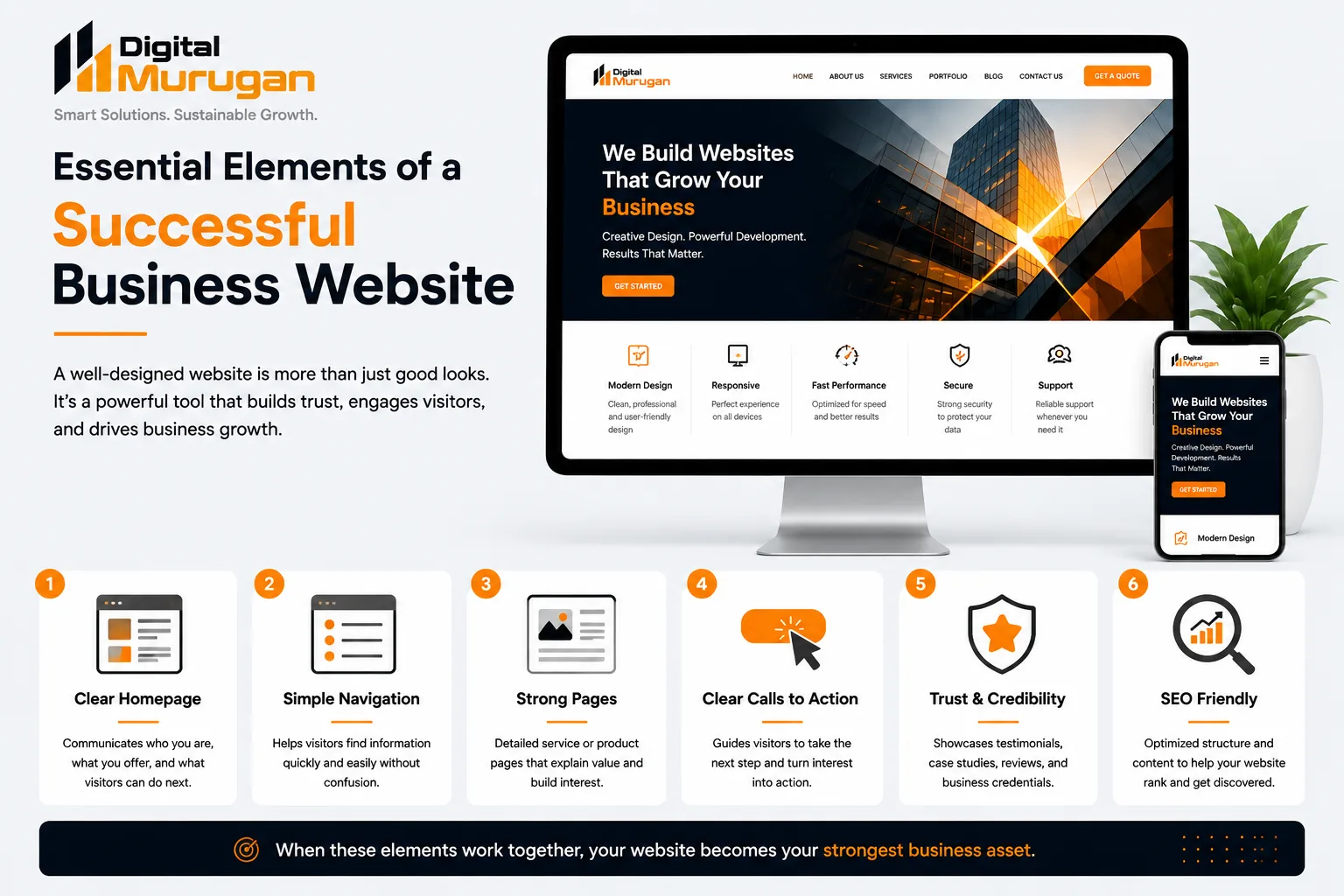
Clear Homepage → Simple Navigation → Strong Pages → Clear Calls to Action → Trust Signals → SEO-Friendly Structure
These elements work together to create a website that is easier to understand, navigate, and use.
Common Website Mistakes Small Businesses Should Avoid
Designing Without a Clear Goal
A website should have a purpose beyond simply existing online.
Making the Website Too Complicated
More animations, features, plugins, and pages do not automatically create a better website.
Every feature should serve a purpose.
Ignoring Mobile Users
A website that works poorly on smartphones can create unnecessary frustration and lost opportunities.
Using Unclear Messaging
Visitors should not have to guess what a business does.
Hiding Important Information
Contact details, services, pricing information where appropriate, and important business information should be easy to find.
Using Poor-Quality Images
Blurry, irrelevant, or inconsistent visuals can reduce the professional appearance of a website.
Forgetting SEO
SEO should be considered during website planning rather than added as an afterthought.
Neglecting Maintenance
A website can become outdated if its software, content, security, and functionality are never reviewed.
What Should a Small Business Website Include?
The exact requirements depend on the business.
A professional service business may need:
- Home
- About
- Services
- Portfolio or case studies
- Blog
- Testimonials
- Contact
An e-commerce business may additionally need:
- Product catalog
- Shopping cart
- Checkout
- Payment processing
- Customer accounts
- Order management
A larger business may require:
- CRM integration
- Customer portals
- Advanced forms
- Marketing automation
- Custom dashboards
The objective is not to build the biggest website.
The objective is to build the right website for the business and its customers.
Website Maintenance After Launch
A website needs attention even after it goes live.
Regular maintenance can include:
- Updating software
- Updating plugins and themes
- Checking security
- Testing forms
- Reviewing backups
- Fixing broken links
- Updating outdated information
- Monitoring performance
- Reviewing analytics
- Publishing new content
Businesses should periodically ask whether the website still represents their current services, brand, customers, and goals.
A good website should evolve with the business.
Frequently Asked Questions
How long does it take to build a business website?
There is no universal timeline.
A simple business website may require considerably less time than a large e-commerce platform or custom web application.
The timeline depends on the number of pages, content, design requirements, functionality, integrations, revisions, and technical complexity.
Is WordPress suitable for small businesses?
Yes. WordPress can be a practical option for many small businesses because it provides a flexible content management system and a large ecosystem of themes and plugins.
However, the platform itself does not guarantee a successful website.
Should every business have a mobile-friendly website?
A business website should provide a good experience across different screen sizes because customers may access it from smartphones, tablets, laptops, and desktop computers.
Does website design affect SEO?
Website structure, content organization, mobile usability, performance, and technical implementation can all influence how effectively search engines can access and understand a website.
SEO is therefore best considered during website planning and development.
How often should a website be redesigned?
There is no fixed redesign schedule.
A website may need significant changes when its business model, branding, technology, customer needs, performance, or functionality changes.
Regular improvements can often be more valuable than redesigning simply because a website has reached a certain age.
Is a custom website always better than a template?
Not necessarily.
The right option depends on the business’s requirements, budget, timeline, functionality, and long-term plans.
A well-designed template-based website can be highly effective when it meets the needs of the business.
Final Thoughts
A business website is more than a digital brochure.
It can become the central platform connecting a company’s brand, content, search visibility, social media, advertising, customer enquiries, and sales.
Good design makes the experience clear and engaging.
Good development makes the website functional, reliable, secure, and scalable.
When both work together, a small business can build an online presence that supports its customers today and grows with the business tomorrow.
The goal is not to create the most complicated website possible.
Build a website that makes it easy for the right people to understand your business, trust your brand, and take the next step.
 Previous Post
 Next Post