
AI Automation: How Businesses Can Save Time, Reduce Repetitive Work and Work Smarter
Every business has work that consumes time without necessarily creating proportional value.
Someone copies information from one system to another.
Someone sends the same type of follow-up email again and again.
Someone checks whether a new enquiry has been answered.
Someone prepares recurring reports.
Someone moves data between spreadsheets and software.
Someone spends hours sorting messages, documents or customer requests.
These tasks may seem small individually.
But repeated every day, every week and every month, they can become a significant operational cost.
This is where AI automation can make a meaningful difference.
Instead of asking employees to manually perform every repetitive step, businesses can design intelligent workflows where software, automation rules and AI work together to handle appropriate parts of the process.
The objective isn’t simply to use more technology.
The objective is to make the business work better.
What Is AI Automation?
AI automation combines artificial intelligence with automated workflows to perform, coordinate or enhance business tasks with less manual intervention.
Traditional automation generally follows predefined rules:
If this happens → do that.
AI automation can add a layer of intelligence to the process.
For example:
Customer sends an enquiry
↓
AI understands the message
↓
Identifies the enquiry type
↓
Extracts relevant information
↓
Updates the CRM
↓
Creates an appropriate response draft
↓
Routes the lead to the right person
Modern AI workflows can range from simple classification or summarization tasks to more complex workflows where AI coordinates multiple activities.
That makes AI automation particularly interesting for businesses dealing with large volumes of repetitive information and communication.
Why Are Businesses Exploring AI Automation?
The reason is simple:
Time is a business resource.
When employees spend hours performing repetitive administrative work, less time remains for activities that require human judgment, creativity and relationships.
AI automation can help businesses:
- Reduce repetitive manual work
- Speed up routine processes
- Organize information
- Improve response times
- Connect different software systems
- Standardize recurring workflows
- Support customer service
- Assist sales teams
- Automate routine communication
- Generate summaries and reports
- Process structured information
- Improve operational visibility
IBM notes that businesses are increasingly using AI to streamline workflows, improve customer experiences, support content creation and optimize operations.
But there is an important distinction.
Automation should not be introduced simply because something can be automated.
The right question is:
Where can automation create meaningful business value without reducing quality, control or trust?
AI Automation Is Not About Replacing Everyone
One of the biggest misconceptions about AI automation is that its purpose is to eliminate human involvement.
That is not necessarily the best way to approach it.
A better model is:
AI handles repetitive work.
Humans handle judgment, relationships and accountability.

For example, an AI system might prepare a customer response.
A human can review it before sending.
An AI system might summarize a sales call.
A salesperson can decide what to do next.
An AI system might categorize leads.
A sales manager can determine which opportunities deserve attention.
This creates a powerful combination:
Machine speed + human judgment.
Current Microsoft guidance similarly recommends evaluating whether a task should be automated, AI-assisted with human leadership, or kept human-led based on factors such as repeatability, impact, error detectability and time sensitivity.
What Kind of Work Can Be Automated?
Not every business process is a good candidate.
The strongest opportunities often have some common characteristics.
Repetitive
The task happens frequently.
Predictable
The process follows a recognizable pattern.
Rule-Based
There are clear conditions and expected outcomes.
Time-Consuming
The task takes meaningful employee time.
Easy to Verify
Errors can be detected before they create significant consequences.
Data-Driven
The workflow involves structured information that software can process.
For example:
Good candidate:
Automatically organize incoming enquiries by category.
Potentially poor candidate:
Automatically make an important strategic decision with no human review.
The difference is not whether AI is technically capable.
It is whether automation is appropriate for the risk and responsibility involved.
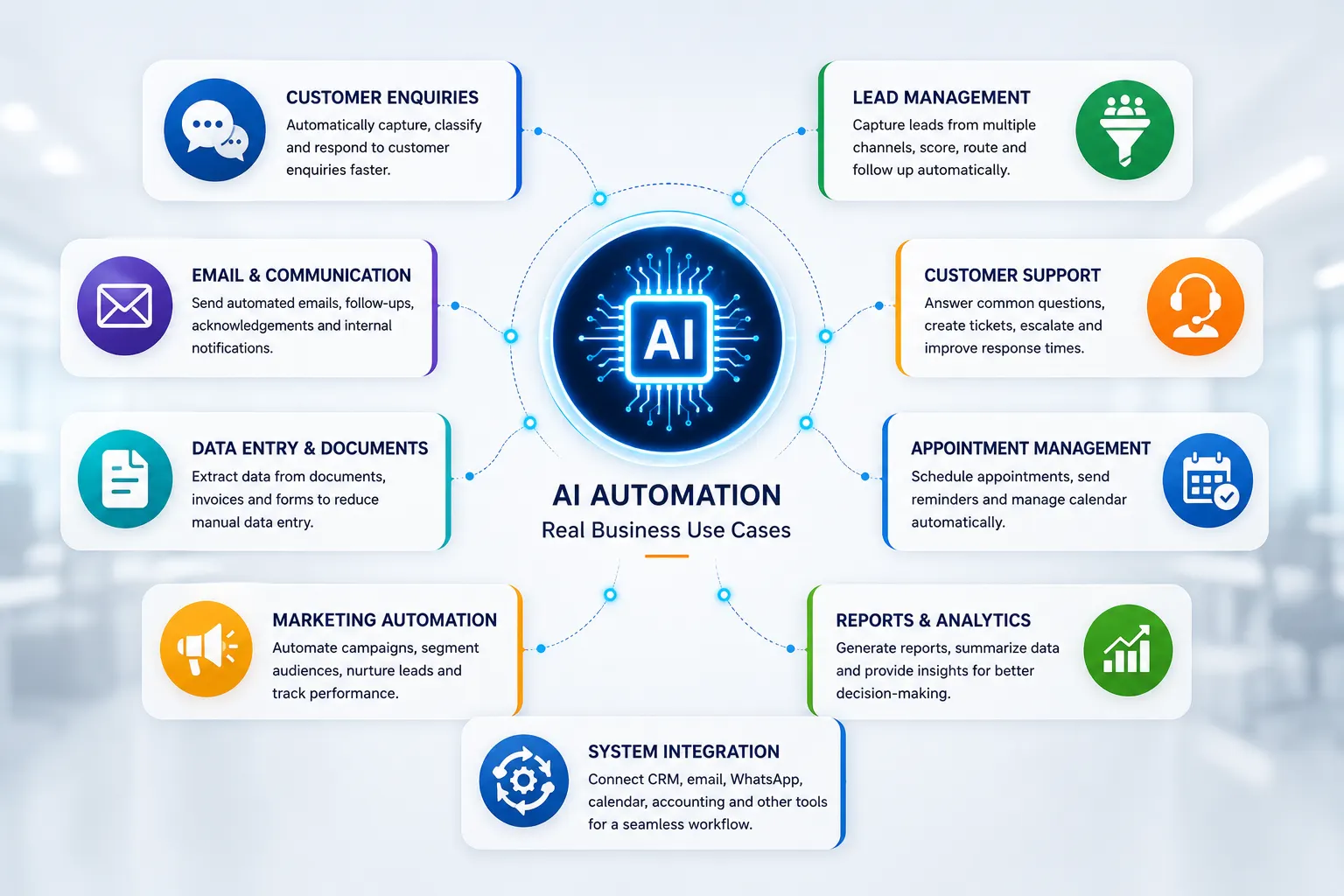
AI Automation for Customer Enquiries
Imagine receiving dozens or hundreds of enquiries every week.
Some ask about pricing.
Some ask about services.
Some request appointments.
Some are existing customers.
Some are sales opportunities.
Some may not even be relevant.
Manually sorting all of these messages can consume considerable time.
An AI-powered workflow could help classify incoming enquiries.
For example:
New enquiry arrives
↓
AI reads the message
↓
Identifies intent
↓
Classifies the enquiry
↓
Extracts customer details
↓
Adds information to CRM
↓
Routes the enquiry
↓
Creates a response draft
↓
Human reviews when necessary
This doesn’t mean every customer interaction should be completely automated.
It means the repetitive first layer can be handled more efficiently.
AI Automation for Lead Management
Lead management is another strong use case.
A potential customer may contact a business through:
- Website forms
- Social media
- Landing pages
- Advertising campaigns
- Online directories
Without a structured workflow, leads can easily become scattered.
AI automation can help bring these interactions into a more organized process.
For example:
Lead captured
→
Information extracted
→
Lead categorized
→
Source recorded
→
Priority assigned
→
CRM updated
→
Sales team notified
→
Follow-up scheduled
This creates a consistent system rather than relying entirely on manual memory.
AI Automation for Email and Communication
Many businesses send repetitive communication every day.
Examples include:
- Appointment confirmations
- Follow-up reminders
- Enquiry acknowledgements
- Meeting summaries
- Internal notifications
- Status updates
- Customer onboarding messages
- Routine reports
AI can assist with drafting, summarizing and classifying communication, while automation can trigger the right workflow at the right time.
For example:
Customer submits enquiry
↓
Automatic acknowledgement
↓
AI prepares relevant response
↓
Salesperson reviews
↓
Response sent
↓
Follow-up scheduled
This can reduce administrative effort while maintaining human control over customer-facing communication.
AI Automation for Data Entry
Data entry is one of the clearest examples of repetitive work.
A business may receive information through:
- Forms
- PDFs
- Emails
- Invoices
- Documents
- Spreadsheets
- Applications
Instead of manually copying every piece of information, AI-powered systems can extract relevant data and send it into another system.
For example:
Invoice received
↓
AI extracts invoice information
↓
Fields validated
↓
Accounting system updated
↓
Exception sent for human review
The final step is important.
If information is unclear or inconsistent, the workflow should have a way to stop and ask for human attention.
AI Automation for Appointment Management
Businesses that depend on appointments can automate many routine steps.
For example:
Customer requests appointment
↓
AI understands request
↓
Checks available options
↓
Offers suitable times
↓
Customer confirms
↓
Calendar updated
↓
Confirmation sent
↓
Reminder scheduled
The exact workflow depends on the systems being used, but the principle is straightforward:
Automate the repetitive coordination.
Let employees focus on the customer relationship.
AI Automation for Customer Support
Customer support is another area where AI can assist.
An AI system can potentially:
- Classify incoming requests
- Search approved information
- Answer common questions
- Summarize customer history
- Suggest responses
- Route complex cases
- Escalate issues
- Create support tickets
But businesses should be careful about fully autonomous customer support.
If a question involves a complaint, sensitive information, financial consequences or an unusual situation, human involvement may be essential.
A good system therefore includes an escalation path.
Simple request → AI assistance
Complex request → Human support
This hybrid model can provide speed without sacrificing accountability.
AI Automation for Sales Teams
Salespeople often spend significant time on administrative tasks.
For example:
- Updating CRM records
- Summarizing meetings
- Preparing follow-up messages
- Categorizing leads
- Searching customer information
- Creating reports
- Scheduling reminders
AI automation can reduce some of this administrative burden.
Imagine:
Sales meeting ends
↓
Meeting transcript processed
↓
AI creates summary
↓
Key requirements extracted
↓
Follow-up actions identified
↓
CRM updated
↓
Follow-up reminder created
The salesperson can then spend more time on the actual relationship.
AI Automation for Marketing
Marketing involves many recurring processes.
AI automation can support activities such as:
- Content ideation
- Content repurposing
- Social media scheduling
- Campaign summaries
- Audience segmentation
- Lead nurturing
- Email personalization
- Performance reporting
- Content classification
However, automation should not replace the brand’s strategic voice.
A business still needs human direction for:
Positioning → Creativity → Brand voice → Strategy → Final approval
AI can accelerate production.
It should not automatically determine what the brand stands for.
Connecting Different Business Tools
One of the biggest opportunities in automation is connecting systems that normally operate separately.
Imagine a business using:
Website
CRM
Calendar
Accounting software
Analytics
Without automation, employees may repeatedly move information between these systems.
A connected workflow can reduce unnecessary handoffs.
For example:
Website enquiry
→ CRM
→ AI classification
→ Sales notification
→ Email acknowledgement
→ Follow-up reminder
Instead of six disconnected activities, the business gets one connected workflow.
This is where automation becomes more powerful than simply adding another AI tool.
Don’t Automate Tasks. Automate Workflows.
This distinction is extremely important.
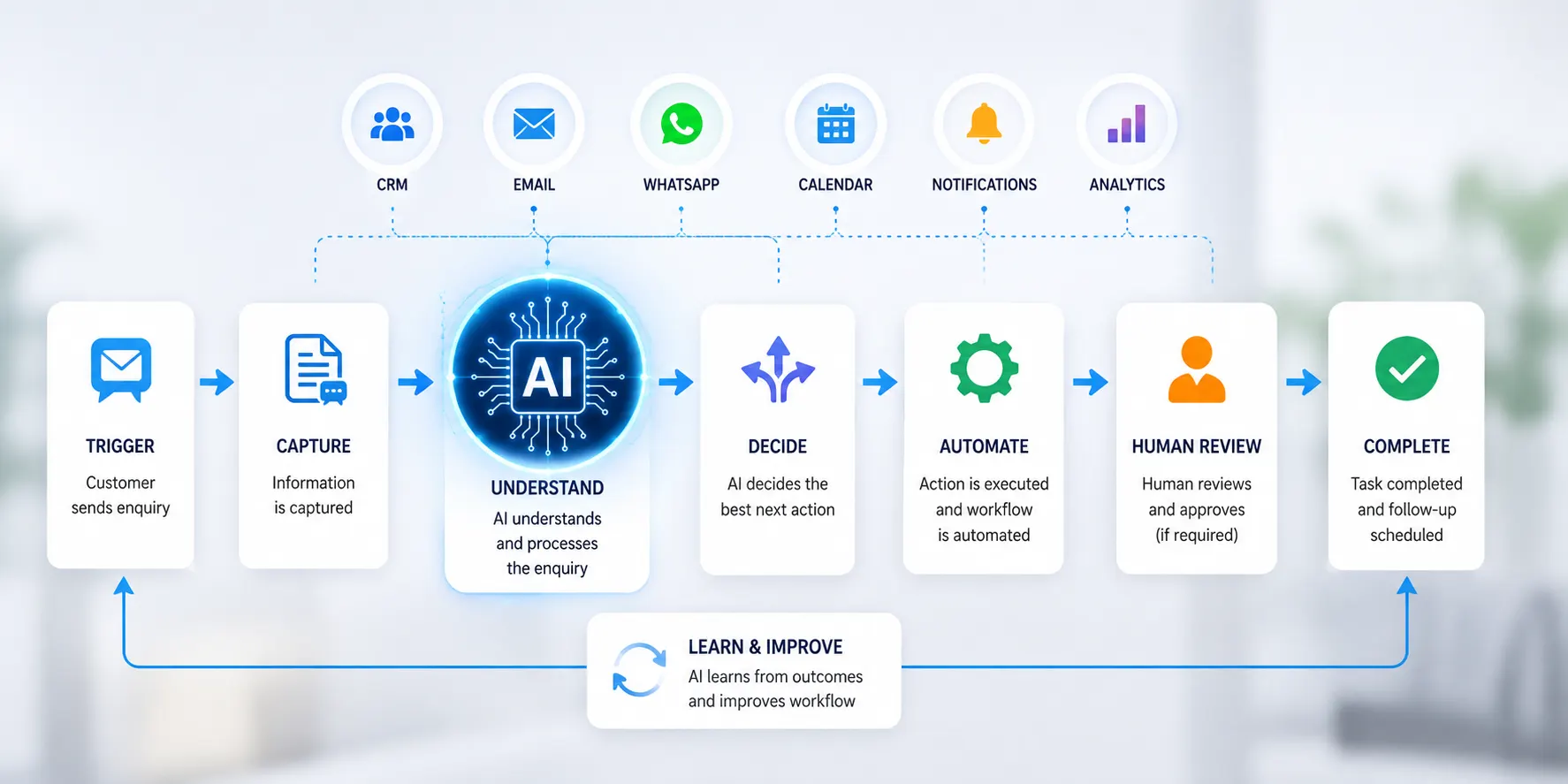
Suppose a business automates only one task:
AI writes an email.
That’s useful.
But the larger opportunity might be:
Lead arrives
→
Lead classified
→
CRM updated
→
Email drafted
→
Human approval
→
Email sent
→
Follow-up scheduled
→
Salesperson notified
Now you’re not automating one isolated task.
You’re improving the entire workflow.
Microsoft’s current guidance similarly warns against creating disconnected “islands of automation” and recommends thinking about the end-to-end service, including handoffs, escalation paths and monitoring.
A Simple AI Automation Workflow
A useful business workflow can often be understood through six stages.
1. Trigger
Something happens.
Example: A customer submits a form.
2. Capture
The system collects the information.
3. Understand
AI interprets or classifies the information.
4. Decide
Rules or predefined conditions determine what happens next.
5. Execute
The workflow performs the appropriate action.
6. Review
A human or monitoring system checks important outcomes.
So the model becomes:
Trigger → Capture → Understand → Decide → Execute → Review
This simple framework can be adapted to many business processes.
Where AI Automation Should NOT Be Used Blindly
More automation does not automatically mean a better business.
Some tasks require judgment, context or accountability.
Be especially careful with:
- Financial approvals
- Legal decisions
- Sensitive customer communication
- Employment decisions
- Confidential information
- High-value transactions
- Irreversible actions
- Safety-critical processes
- Complex strategic decisions
The more serious the consequence of an error, the stronger the need for human oversight.
Microsoft’s current security guidance emphasizes meaningful human control, approval for high-risk or irreversible actions, least-privilege access and clear visibility into what autonomous systems are doing.
Common AI Automation Mistakes
1. Automating Before Understanding the Process
If the existing process is broken, automating it may simply make the broken process faster.
First understand:
What happens today?
Then improve it.
Then automate appropriate parts.
2. Automating Everything
Not every task needs AI.
Sometimes a simple rule-based automation is better.
Sometimes a human should remain responsible.
Use the simplest technology that solves the actual problem.
3. No Human Escalation
What happens when AI doesn’t know the answer?
There should be a clear path to a human.
3. No Human Escalation
What happens when AI doesn’t know the answer?
There should be a clear path to a human.
4. Poor Data Quality
AI systems depend heavily on the information they receive.
Incomplete, inconsistent or outdated information can produce poor outcomes.
5. Giving AI Too Much Access
An AI system should not automatically have unrestricted access to every business system.
Permissions should be limited to what the workflow actually requires.
6. No Monitoring
A workflow can fail silently.
Businesses should monitor important processes for:
- Errors
- Failed actions
- Response times
- Accuracy
- Exceptions
- Unexpected behaviour
7. Focusing Only on the Technology
The newest AI model isn’t necessarily the best solution.
The business problem should come first.
Problem → Process → Solution → Technology
Not:
Technology → Find something to automate
How to Start AI Automation Without Overcomplicating It
You don’t need to automate your entire business on day one.
Start with one process.
Step 1 — List Repetitive Tasks
Ask your team:
“What do we repeatedly do that consumes time?”
Step 2 — Estimate the Cost
How many hours are spent on the task each week?
Step 3 — Identify the Pattern
Does the process follow a predictable structure?
Step 4 — Evaluate the Risk
What happens if automation makes a mistake?
Step 5 — Choose the Right Level of Automation
Possible options:
Human-led
AI-assisted
Automated with human review
Highly automated
Step 6 — Build a Small Pilot
Start with one clearly defined workflow.
Step 7 — Test
Run realistic examples.
Step 8 — Monitor
Measure accuracy, time saved and failures.
Step 9 — Improve
Fix weak points.
Step 10 — Expand
Only after the workflow proves useful should you consider applying the same approach elsewhere.
Measure the Business Impact
AI automation should produce measurable value.
Don’t stop at:
“The AI workflow is working.”
Ask:
How much time did it save?
Did response times improve?
Did errors decrease?
Did customer satisfaction improve?
Did employees spend more time on valuable work?
Did the workflow increase conversion or retention?
Did operational costs decrease?
For example:
Before automation:
20 hours/week
After automation:
8 hours/week
Potential time reduction:
12 hours/week
Now you have a business metric.
The purpose of automation is not to create impressive technology.
It is to create measurable improvement.
The Future of Business Automation
AI is moving automation beyond simple “if this, then that” rules.
Modern AI workflows can interpret information, summarize content, classify requests and coordinate multiple steps.
As these systems become more capable, businesses will have more opportunities to build intelligent workflows around customer service, operations, sales, marketing and internal processes.
But greater capability also means greater responsibility.
The more autonomy a system receives, the more important it becomes to define:
- What it can access
- What it can do
- What it cannot do
- When it must ask for approval
- When it must escalate
- How its actions are monitored
- Who remains accountable
That balance between automation and control will become increasingly important.
A Practical AI Automation Framework for Businesses
If you want a simple framework to remember, use:
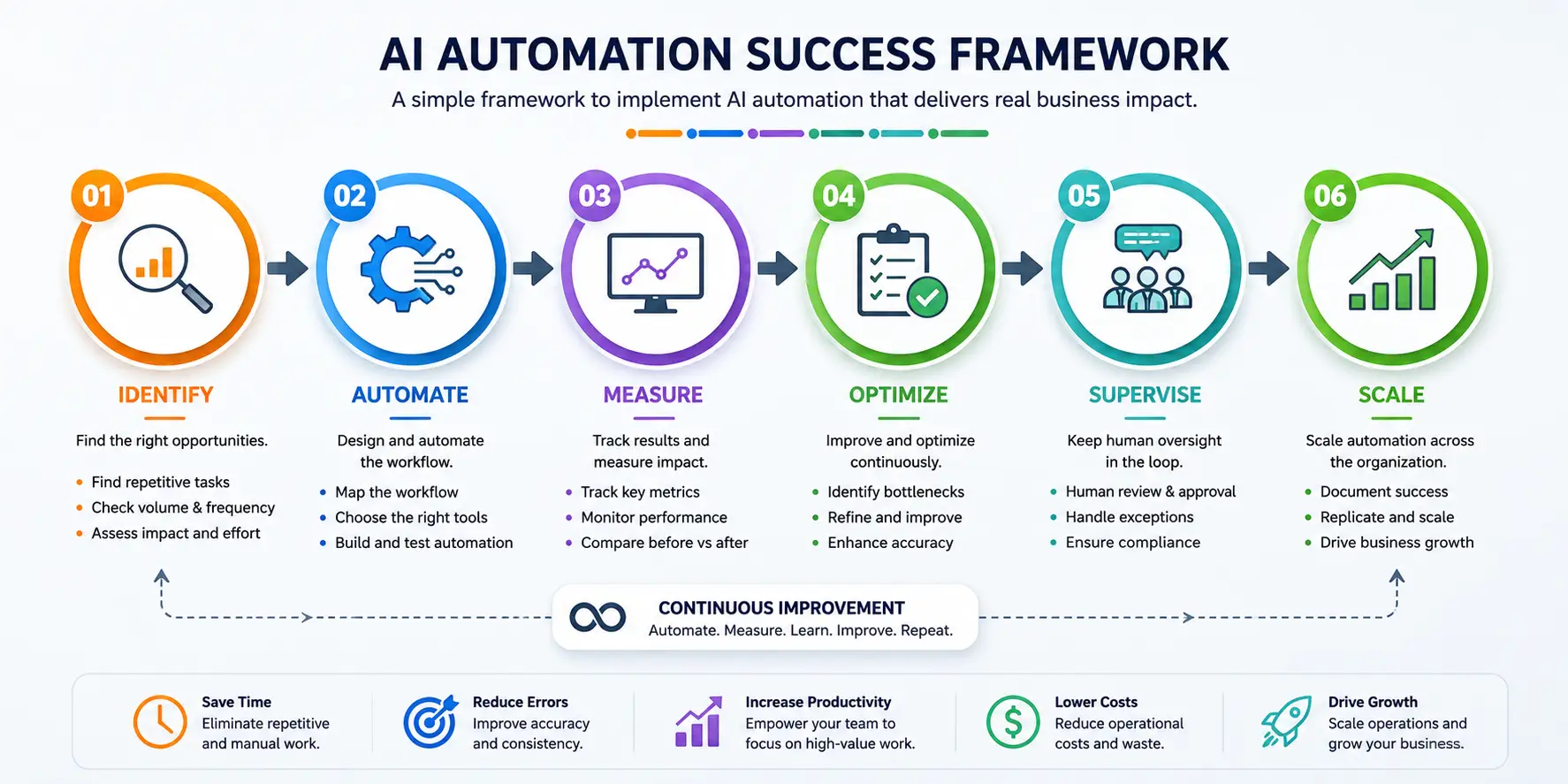
IDENTIFY
Find repetitive, time-consuming processes.
↓
MAP
Understand every step and handoff.
↓
PRIORITIZE
Choose processes with meaningful value and manageable risk.
↓
AUTOMATE
Use AI, rules and integrations where appropriate.
↓
SUPERVISE
Keep humans involved where judgment or accountability matters.
↓
MEASURE
Track time, quality, errors and business outcomes.
↓
OPTIMIZE
Improve the workflow based on real-world performance.
↓
SCALE
Expand successful automation to additional processes.
This creates a sustainable cycle:
Identify → Map → Prioritize → Automate → Supervise → Measure → Optimize → Scale
Final Thoughts
AI automation is not about adding artificial intelligence to every part of a business.
It is about identifying where intelligent technology can remove unnecessary friction.
A repetitive task that takes ten minutes may not seem important.
But when that task happens hundreds of times, the cost becomes significant.
A slow response to a customer may seem like a small operational issue.
But repeated delays can affect customer experience.
A salesperson spending hours updating a CRM may seem normal.
But those hours could have been spent building relationships.
This is why AI automation should be viewed as a business strategy, not simply a technology trend.
Start with the problem.
Understand the process.
Find the repetitive work.
Automate what makes sense.
Keep humans responsible for what requires judgment.
Measure the outcome.
Then improve.
The goal isn’t to make your business more automated just for the sake of automation.
The goal is to make your business faster, smarter, more efficient and more human where it matters most.
Build Smarter Workflows With Digital Murugan
Every business has repetitive processes.
The challenge is identifying which ones are worth automating and designing the right workflow around them.
Digital Murugan helps businesses explore AI automation solutions that can connect tools, streamline repetitive processes and create smarter workflows around real business needs.
From customer enquiries and lead management to communication, data handling, marketing workflows and business process automation, the right solution starts with understanding your process first.
Don’t automate everything. Automate what matters.
Work Smarter. Save Time. Grow Better.
 Previous Post
 Next Post