
Why Companies Should Adopt Digital Business Cards for Their Teams
In today’s digital business environment, building professional relationships and sharing contact information efficiently are essential for success. Companies regularly connect with clients, business partners, suppliers, and potential customers. However, traditional paper business cards can be difficult to update, easy to lose, and costly to print repeatedly.
Digital business cards offer a modern alternative that allows employees to share their professional contact information through smartphones, QR codes, email, messaging applications, and other digital channels. They help businesses present a consistent brand identity while making professional networking more convenient.
For companies looking to modernize their communication and improve their networking experience, adopting digital business cards can be a practical step toward a more connected workplace.
What Are Digital Business Cards?
Digital business cards are electronic versions of traditional business cards. They contain important professional details such as an employee’s name, job title, company name, phone number, email address, website, and social media profiles.
Depending on the platform, a digital business card may also include a company logo, professional photograph, downloadable contact file, portfolio links, or a button for scheduling a meeting.
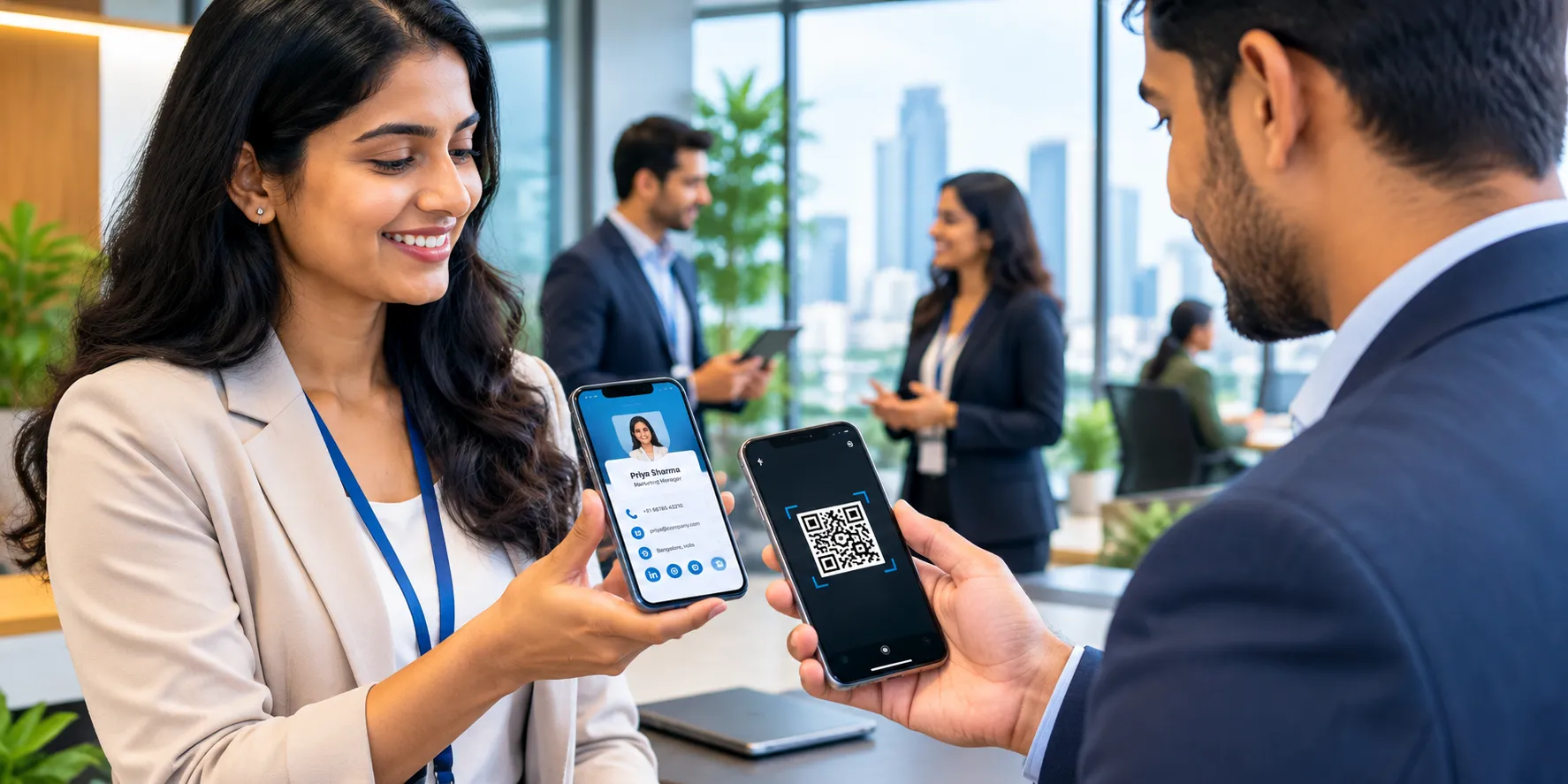
Employees can share their cards using a QR code, a direct link, email, or compatible contact-sharing features. Recipients can access the information on their devices without needing a physical card.
For businesses with multiple employees, digital business cards can provide a convenient way to maintain consistent professional contact information across the organization.
1. Maintain Consistent Company Branding
A consistent brand identity helps businesses appear professional and recognizable. When employees use different business card designs, outdated logos, or inconsistent contact formats, the company’s overall presentation can become less unified.
Digital business cards allow companies to establish common branding guidelines across their teams. Organizations can standardize elements such as logos, brand colors, typography, company descriptions, and website links.
Employees can still display their individual names, roles, and contact details while following the company’s visual identity.
Practical benefit: A consistent presentation helps employees represent the business professionally during meetings, conferences, client visits, and networking events.
2. Reduce Printing and Replacement Costs
Traditional business cards require printing, storage, and reordering. When an employee changes departments, receives a promotion, or updates their contact information, existing cards may become outdated.
Digital business cards reduce the need to print new cards for every update. Once the information is changed on the relevant platform, the updated details can be shared through the same digital link or QR code, depending on the service.
For organizations with large teams, this can simplify business card management and reduce recurring printing expenses.
The actual savings depend on the company’s team size, printing frequency, and the cost of its digital card platform.
3. Make Contact Sharing Faster and Easier
Employees often need to exchange contact information quickly during business meetings, trade shows, conferences, and client presentations. Searching for a physical card or manually typing contact details can slow down the interaction.
Digital business cards make this process more convenient. Employees can share their contact information by displaying a QR code, sending a link, or using supported digital sharing options.
Recipients can open the card on their smartphones and save the details when the platform supports contact downloads.
This simple process helps employees spend less time exchanging information and more time building meaningful professional relationships.
4. Simplify Employee Contact Updates
Employee information can change frequently as companies grow. New team members join, employees change roles, and departments receive updated contact details.
Managing these changes through printed cards can create unnecessary administrative work.
Digital business cards make it easier to update information without reprinting physical materials. Depending on the platform, administrators or employees can revise details such as job titles, phone numbers, email addresses, and website links.
Businesses should establish a clear process for keeping these details accurate and removing access when employees leave the organization.
Practical benefit: Updated contact information helps clients, suppliers, and partners reach the right person more easily.
5. Improve Networking at Business Events
Networking events provide valuable opportunities for employees to meet potential clients, partners, and industry professionals. Digital business cards help make these interactions more efficient.
Instead of carrying large quantities of printed cards, employees can share their details directly from their phones. QR codes can also be displayed during presentations, exhibitions, and professional meetings.
Digital cards may include links to company websites, product pages, portfolios, or appointment-booking pages. These links give recipients additional ways to learn about the organization after the initial conversation.
By making follow-up information easier to access, companies can create a smoother networking experience.
6. Support Remote and Hybrid Teams
Modern companies often operate across multiple offices, cities, and time zones. Remote and hybrid employees may communicate with clients through video meetings, email, online conferences, and messaging platforms.
Digital business cards work well in these situations because employees can share their contact details without meeting someone in person.
A team member can send a card through email or chat, include it in a meeting follow-up, or share a link during a virtual presentation.
This flexibility helps distributed teams maintain a professional presence regardless of where they work.
7. Provide Useful Links in One Place
A professional contact card can do more than display a name and phone number. Depending on the available features, it can connect recipients to several useful business resources.
For example, a company’s digital business cards may include:
Official company website
Professional email address and phone number
LinkedIn profile or other relevant professional profiles
Product and service pages
Portfolio or case studies
Meeting-booking links
Customer support information
Keeping these resources together gives recipients a convenient starting point for learning more about the employee and the organization.
Companies should prioritize relevant links and avoid overcrowding cards with unnecessary information.
8. Support More Sustainable Business Practices
Businesses are increasingly considering how their daily operations affect resource consumption. Traditional business cards require paper, ink, packaging, and transportation, while unused or outdated cards may eventually be discarded.
Digital business cards can reduce the need for printed materials, particularly when employees share contact details frequently.
However, digital services also consume energy and require electronic devices and infrastructure. Their overall environmental impact depends on how they are used.
For companies seeking to reduce unnecessary printing, digital cards offer one practical option as part of a broader sustainability strategy.
9. Improve Contact Management and Follow-Ups
Collecting a contact is only the beginning of a business relationship. Employees must often follow up with potential customers, arrange meetings, send proposals, or provide additional information.
Digital business cards can make these next steps easier by linking recipients to relevant resources or contact options.
Some platforms also offer analytics, contact-management integrations, or lead-capture features. These capabilities vary by provider and may require a paid plan or additional configuration.
Companies should choose features that support their actual workflow rather than paying for tools they do not need.
When used appropriately, digital cards can complement a company’s customer relationship management process and help employees organize their professional interactions.
10. Strengthen Professional Communication Across Departments
In larger organizations, employees from different departments may interact with the same clients or business partners. Inconsistent contact details can create confusion and make it harder for people to identify the correct point of contact.
Digital business cards can help standardize how employees present their information. A shared template can establish consistent formatting, while individual details identify each employee’s responsibilities.
For example, sales representatives can link to product information, customer support employees can include help resources, and managers can provide meeting-booking options.
This approach makes professional communication more organized while allowing each department to highlight its most relevant resources.
How to Introduce Digital Business Cards Across Your Company
Adopting digital business cards does not need to be complicated. Companies can follow a few practical steps to introduce them effectively.
Step 1: Choose a Suitable Platform
Compare digital business card providers based on customization, ease of use, security, contact-sharing features, administration tools, and pricing. Check whether the platform supports your company’s devices and business requirements.
Step 2: Establish Brand Guidelines
Create a standard template using approved company branding. Define which details should appear on every card and which fields employees can customize.
Step 3: Prepare Employee Information
Collect accurate names, job titles, business contact details, and relevant professional links. Review the information before publishing the cards.
Step 4: Distribute Cards to Employees
Provide each employee with their digital card link and QR code, if available. Explain how to share the card during meetings, online conversations, and networking events.
Step 5: Train Employees
Offer simple instructions on updating contact details, sharing cards, protecting personal information, and following up with new contacts.
Step 6: Review and Maintain the Cards
Assign responsibility for reviewing card information and managing access. Check that links work correctly and remove or update cards when employee roles or employment status change.
Step 7: Measure the Results
Evaluate practical outcomes such as employee adoption, reduced printing needs, ease of contact sharing, and feedback from staff. If the platform provides analytics, review them in accordance with your company’s privacy policies.
What Should Companies Consider Before Adopting Digital Business Cards?
Although digital business cards offer several advantages, companies should assess their needs before selecting a solution.
Security and privacy: Share only necessary business information. Review the platform’s privacy policy, access controls, data handling practices, and administrative features.
Ease of use: Employees and recipients should be able to access the cards without unnecessary steps. Consider the experience for people who are less familiar with digital tools.
Customization: Choose a platform that supports your branding and provides enough flexibility for different employee roles.
Integration: If your company uses customer relationship management software or contact-management tools, check whether the digital card platform supports the integrations you need.
Accessibility: Some recipients may prefer traditional business cards or may have limited internet access. Keeping a small supply of printed cards for specific situations can help accommodate different preferences.
Ongoing management: Establish clear ownership for updates, employee onboarding, and access removal to keep the information accurate and secure.
Considering these factors will help your company choose a solution that fits its workflow and supports long-term use.
Why Digital Murugan Can Help Your Business Modernize
At Digital Murugan, we understand the importance of presenting your business professionally and making it easier for customers to connect with your team.
Digital business cards can support a modern networking strategy by bringing essential contact information and relevant business links together in one accessible place.
Whether your company is a startup, a growing organization, or an established business, choosing the right digital communication tools can help create a more consistent and convenient experience for employees and customers.
Digital Murugan helps businesses explore digital solutions that align with their branding, communication, and growth objectives. A well-planned digital presence can make it easier for potential customers to discover your services and connect with your team.
Conclusion
Digital business cards offer companies a practical way to modernize professional networking, maintain consistent branding, simplify contact updates, and reduce reliance on printed materials.
They are particularly useful for organizations with multiple employees, remote teams, frequent networking activities, and changing contact information. By selecting a suitable platform, establishing clear brand guidelines, and maintaining accurate employee details, businesses can make digital cards a valuable part of their communication strategy.
The goal is not simply to replace paper with technology. It is to make professional connections easier to establish, maintain, and develop.
Ready to modernize the way your team connects with customers and business partners?
Contact Digital Murugan to explore digital solutions that can help your business build a stronger professional presence and create more convenient customer connections.
 Previous Post