
What Is a Digital Business Card?
In today’s digital-first world, exchanging contact information is no longer limited to handing someone a traditional paper business card. A digital business card provides a modern way to share your professional information using a smartphone, QR code, link, or other digital methods.
Whether you are a business owner, freelancer, professional, or part of a growing organization, a digital business card can make networking faster, more convenient, and easier to manage.
What Is a Digital Business Card?
A digital business card is an online version of a traditional business card. Instead of printing your name, contact details, and business information on paper, the information is presented through a digital profile or webpage.
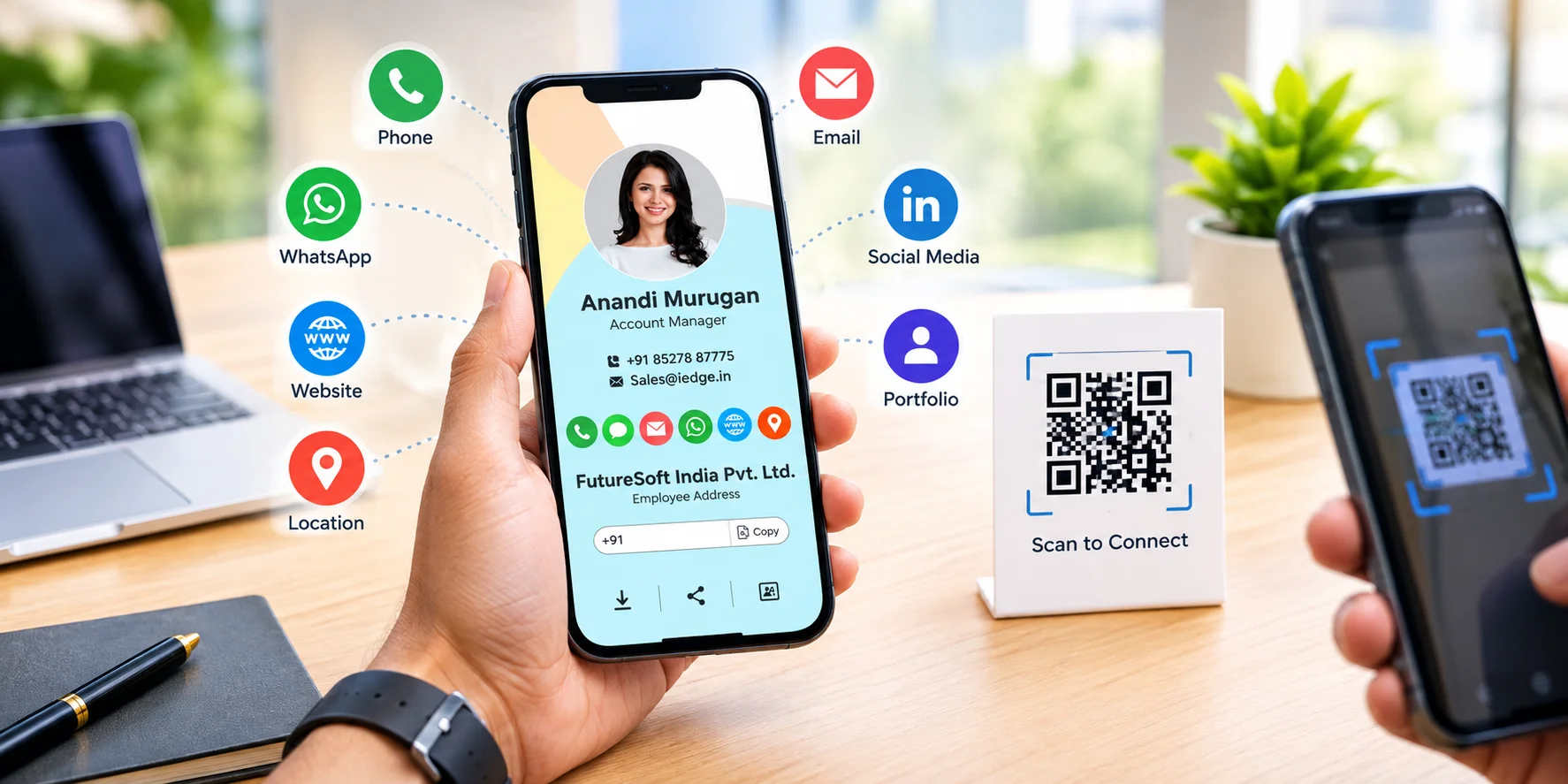
A typical digital business card may include:
- Name and professional designation
- Company name and business details
- Phone number and email address
- Website link
- Social media profiles
- Business location
- Services or products
- Company logo
- WhatsApp or direct contact options
- A QR code for quick access
Users can share the card through a link, QR code, smartphone, email, messaging apps, or other digital channels.
How Does a Digital Business Card Work?
Digital business cards are designed to make sharing contact information simple.
A user creates a digital profile containing their professional information. Once the card is created, it receives a unique link or QR code. When someone opens the link or scans the QR code, they can view the information on their smartphone.
For example, during a business meeting, instead of searching for a pen and writing down contact information, you can simply share your digital card or let the other person scan your QR code.
This makes the exchange of information quick and convenient.
What Information Can You Include?
One of the advantages of a digital business card is that it can contain more information than a traditional printed card.
Depending on the platform or design, you can include:
Contact Information
Add your phone number, email address, website, and other important contact details.
Business Information
Provide a short description of your company, services, products, or professional expertise.
Social Media Links
Connect your professional social media profiles so people can easily discover your online presence.
Location
Businesses with physical locations can include their address or map information to help customers find them.
Communication Options
You can provide direct links for contacting your business through supported communication platforms.
Portfolio and Media
Professionals such as designers, photographers, developers, and creators can connect their portfolio, projects, videos, or other work.
Benefits of Using a Digital Business Card
1. Easy to Share
A digital business card can be shared through a link or QR code. This makes it convenient during meetings, events, networking sessions, and online conversations.
2. No Printing Required
Traditional business cards need to be designed, printed, stored, and reordered. Digital cards eliminate the need for physical printing, making information sharing more convenient.
3. Easy to Update
If your phone number, website, job title, or other information changes, a digital card can generally be updated without printing a new batch of cards.
4. More Information in One Place
A digital card can connect multiple types of information from a single profile, including contact details, websites, social media accounts, portfolios, and business information.
5. Convenient for Networking
At conferences, meetings, exhibitions, and other professional events, sharing a digital card can make exchanging information faster.
6. Professional Online Presence
A well-designed digital business card can act as a simple professional profile, helping people understand who you are and how they can contact you.
Digital Business Cards vs Traditional Business Cards
Traditional business cards are still useful for many situations, but digital business cards offer additional flexibility.
| Feature | Traditional Business Card | Digital Business Card |
|---|---|---|
| Format | Printed card | Digital profile |
| Sharing | Physical exchange | Link, QR code, or digital sharing |
| Updates | Requires reprinting | Can be updated digitally |
| Information | Usually limited | Can include multiple links and details |
| Storage | Physical | Accessible through a device |
| Online Links | Limited | Can directly connect to websites and profiles |
The right option depends on your networking needs. Some professionals may also choose to use both physical and digital cards.
Who Can Use a Digital Business Card?
Digital business cards can be useful for many professionals and organizations.
Business Owners
Business owners can use them to share company information and contact details with potential customers and partners.
Freelancers
Freelancers can connect their contact information with portfolios and professional profiles.
Sales Professionals
Sales teams can quickly share their details during meetings, events, and client interactions.
Entrepreneurs
Entrepreneurs can use digital cards while networking with investors, partners, customers, and other professionals.
Creative Professionals
Designers, photographers, video creators, and other creative professionals can connect their portfolios directly to their cards.
Organizations
Companies can create digital profiles for employees and make it easier for customers and partners to contact the right person.
How QR Codes Make Digital Business Cards Easier to Share
QR codes have become a convenient way to access digital information using a smartphone.
A QR code connected to a digital business card can be placed on:
- Printed materials
- Posters
- Brochures
- Product packaging
- Presentations
- Office displays
- Websites
- Email signatures
Someone can scan the code with a smartphone and access the digital business card without manually entering contact information.
How to Create an Effective Digital Business Card
Creating a digital business card is more than simply adding contact information. The card should be clear, professional, and easy to navigate.
Here are some useful practices:
Keep the information clear: Include the details that people are most likely to need.
Use consistent branding: Your colors, logo, typography, and visual style should match your professional identity.
Make contact options easy to find: Phone, email, website, or other important contact methods should be clearly accessible.
Add useful links: Include your website, portfolio, social profiles, or other relevant resources.
Make it mobile-friendly: Since most people will access the card on smartphones, the design should work well on smaller screens.
Are Digital Business Cards the Future of Networking?
Networking is increasingly connected to digital platforms, online communication, and mobile technology. Digital business cards fit naturally into this environment by providing a convenient way to share professional information.
They do not necessarily replace traditional business cards in every situation. Instead, they provide another way for professionals and businesses to exchange information and maintain an online presence.
As businesses continue to adopt digital tools, digital business cards can become a useful part of modern networking.
Final Thoughts
A digital business card is a modern alternative to a traditional printed business card. It allows professionals and businesses to share contact information, websites, social profiles, portfolios, and other details through a digital profile, link, or QR code.
For businesses looking for a convenient way to connect with customers and professional contacts, a well-designed digital business card can make information sharing simpler and more accessible.
With the right design and information, your digital business card can become more than just a contact card—it can serve as a compact digital introduction to your professional identity or business.
 Previous Post
 Next Post